
Purchase requests that move without being chased
From purchase request to approved PO and goods receipt, every step has an owner, a deadline and a record — and the purchase order PDF is generated for you.
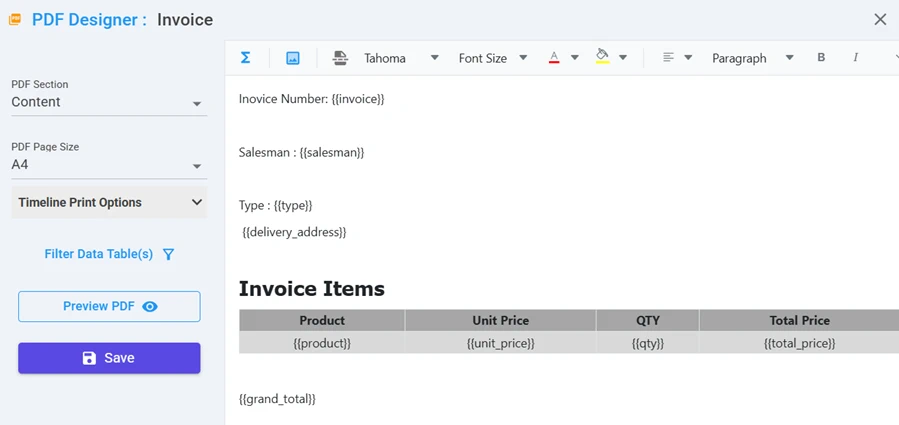
PDF designer — lay out a document once, generate it from every record.
What Procurement teams build with NileDesk
Each of these is built from the same no-code components, so you can start with one and add the next when you're ready.
Purchase requests & approvals
Route by amount or department using conditions or expressions — e.g. above a threshold, add a finance approval.
Purchase orders
Generate the PO as a formatted PDF from the approved request and email it as an attachment.
Vendor onboarding
Collect vendor details and documents through a form, review and approve, then store them in a vendor dataset.
Goods receipt & stock
Record received stock and update inventory datasets automatically with an update-data step.
Quotation comparison
Capture multiple quotes in a form table and calculate totals with aggregate fields.
Spend reporting
Pivot reports and charts by vendor, category or department, exportable to Excel/CSV.
Platform features that matter here
- Branch / decide steps based on conditions, expressions or AI-evaluated rules
- Form tables with lookups into vendor and product datasets
- PDF designer with your own layout and data placeholders
- Email step can attach the generated PDF automatically
A good first step
Pick the one process in your team that generates the most follow-up messages. Build it in the free trial — from a template, from an AI prompt, or from scratch — and run it with the people involved.
See your own process running this week
Install a ready-made solution or describe your process to the AI designer, invite your team, and start moving real work through it.