
Run IT requests, changes and assets from one place
Replace the shared mailbox and the asset spreadsheet. Requests arrive through a form, route to the right engineer automatically, and every change is approved and recorded before it happens.
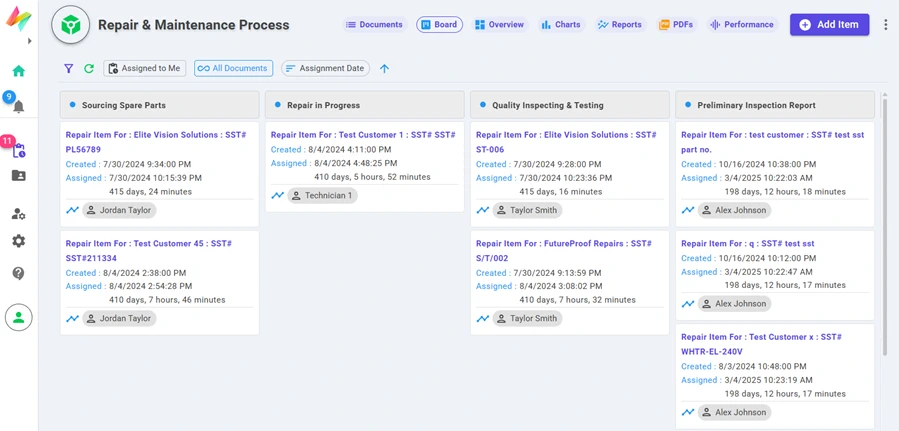
Board view — every item, its stage and its assignee at a glance.
What IT teams build with NileDesk
Each of these is built from the same no-code components, so you can start with one and add the next when you're ready.
IT support requests
Users raise tickets from web, mobile or a WhatsApp/web AI agent. Route by category to the right engineer or group.
Change management
Request → risk assessment → approval → implementation tracking, with every decision kept in the item's history.
Asset & consumables tracking
Keep assets, categories and locations in datasets, and update them automatically when a request is fulfilled.
Access & account requests
Manager approval followed by an IT step, with the right people notified at each stage.
Recurring checks
Schedule maintenance or monitoring logs to be created daily, weekly or monthly — no one has to remember.
Escalation to Jira or Slack
Push escalated items to Jira or post alerts in Slack with an integration step.
Platform features that matter here
- QuickStart solutions for IT Support Request and IT Change Management
- Assignment by role, group, field value or dataset lookup
- Board view for the service desk, flow view for approvals
- Overview dashboard shows overdue items and exceeded step deadlines
A good first step
Pick the one process in your team that generates the most follow-up messages. Build it in the free trial — from a template, from an AI prompt, or from scratch — and run it with the people involved.
See your own process running this week
Install a ready-made solution or describe your process to the AI designer, invite your team, and start moving real work through it.