
Contract reviews and policy workflows you can trace
Give the business one way to request legal review, keep every contract's status visible, and keep a complete record of who reviewed and approved what.
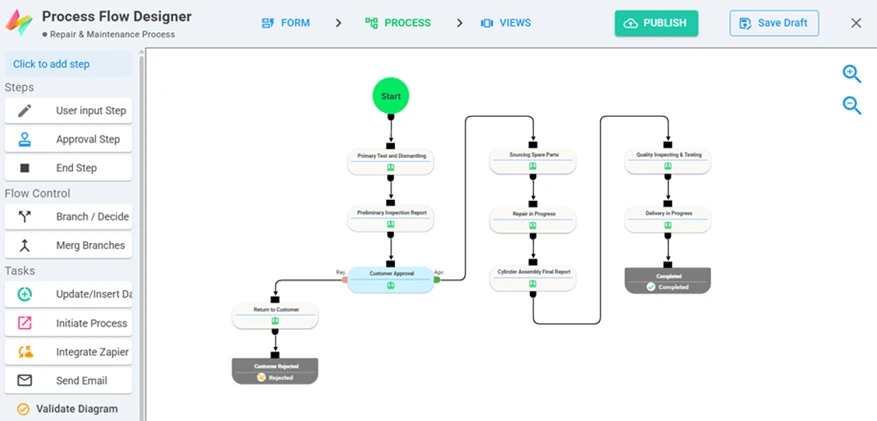
Process designer — approvals, rejections and branches drawn visually.
What Legal & Compliance teams build with NileDesk
Each of these is built from the same no-code components, so you can start with one and add the next when you're ready.
Contract review requests
Business submits the contract and context; legal reviews, comments and approves or returns it.
Policy approvals
Draft, review and sign-off steps with named approvers.
Compliance checklists
Recurring checks scheduled automatically, with evidence attached.
Incident & issue reporting
Capture issues through a form and route them to the right owner.
NDA requests
A standard request form that generates the NDA PDF from a template.
Document registers
Keep contracts and policies in a dataset with renewal dates.
Platform features that matter here
- Every input and decision is kept in the item's history
- Signature fields and PDF generation
- Fine-grained roles and permissions per process
- Self-hosted option if documents must stay on your own servers
A good first step
Pick the one process in your team that generates the most follow-up messages. Build it in the free trial — from a template, from an AI prompt, or from scratch — and run it with the people involved.
See your own process running this week
Install a ready-made solution or describe your process to the AI designer, invite your team, and start moving real work through it.